

If you've ever added a token to your wallet or used a DeFi platform like SaucerSwap, you've already interacted with contract addresses. It’s a unique identifier for a smart contract deployed on a distributed network. Knowing how it works and how to verify it is essential to avoid some of the most common mistakes in the crypto world, such as loss of funds, which can happen if a faulty address is stated at any point during a transaction.
In this article, we explain how these addresses function across different networks, including Hedera; how to check them before you use them; what warning signs might suggest a suspicious contract; and much more.
What Is a Crypto Contract Address?
A crypto contract address is a unique identifier for a smart contract deployed on a blockchain or another kind of distributed ledger network. The smart contract itself is code stored on the chain after it's deployed.
Contract Address Meaning in Simple Terms
To a beginner, contract addresses may look no different from wallet addresses. Networks compatible with Ethereum Virtual Machine (EVM) display contract addresses in a format identical to regular wallet addresses: 42 characters long, beginning with 0x. An Ethereum contract address, for example, looks identical in format to a regular Ethereum wallet address.
Even though wallet and crypto contract addresses may follow the same format, they refer to different things. A contract address refers to code that has been deployed on the network (you can think of it as a front door to a blockchain program), while a wallet address points to an account managed by a private key.
The risk is that if you paste a unique contract address where a receiving wallet address is expected, the transaction may fail, or, what’s worse, go through and send assets to a contract that can’t easily return them, as it may not have a built-in function to send them back. So, it's always better to verify an address on an explorer before using it.
Contract Address vs. Wallet Address
Before we go further, let’s compare what stands behind smart contracts and wallet addresses:
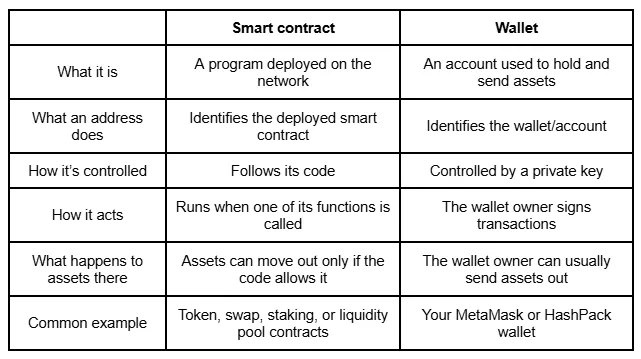
Token Address vs. Contract Address
In some cases, people use the terms “contract address” and “token address” interchangeably. But that is not correct.
Many tokens on Ethereum and other EVM-compatible networks follow the ERC-20 standard. A token built on this standard is a smart contract deployed on the network. So when people refer to a token address, they typically mean an address of the smart contract that manages that token — the one that tracks balances, handles transfers, and defines properties like the token name, symbol, and total supply.
However, the exceptions are ETH on Ethereum and HBAR on Hedera, which aren’t tokens in the usual sense. They're the base currencies of their respective networks, built into the protocol itself rather than deployed as separate contracts. So, neither “token address” nor “contract address” is the common label for them.
How Contract Addresses Work On-Chain
Let’s establish how an address is created and deployed, what details are visible when you check it via an explorer, and whether it has a private key.
What Happens When a Smart Contract is Deployed?
Here’s how the deployment process occurs:
- A developer writes the code, compiles it, and submits it to the network.
- The network processes the transaction, and if successful, the smart contract is deployed and receives its own unique contract address.
It remains associated with this address. Interactions with it are recorded on-chain, and once recorded, they’re generally not reversible.
What Lives at the Address?
When you look up an address on a network explorer like Etherscan or HashScan, you can usually see the following:
- The code of the contract. If a developer has confirmed the source code of a smart contract deployed on the network, you can read what it does.
- The contract’s functions. These are the actions it can perform when called, such as transferring tokens, approving spending, or swapping assets.
- State and balances. A contract may hold tokens or track user balances internally.
- Events. This is a log of past transactions and interactions with it.
- Contract information. Token name, symbol, total supply, and similar metadata, if it's a token contract.
This is one of the strengths of public distributed networks. You don't have to rely on a project's claims about its token, as you’re able to verify its reliability personally on an explorer.
Can a Contract Address Have a Private Key?
No. A typical smart contract doesn't have a private key. It’s not managed by any individual in the same way a wallet is. As we specified earlier, smart contract functionality is built to execute automatically according to predefined rules.
Why Contract Addresses Matter for Tokens and DeFi
When you begin using DeFi products, such as exchanging on a DEX or moving assets, crypto contract addresses become a regular part of the process. In this section, we explain how wallets and DeFi protocols actually use them.
How Wallets Use Token Addresses
When your wallet displays a token, it usually reads the token details directly from its contract on the network. And its address serves as the token contract's identifier.
The information it reads includes:
- Name. For example, "USD Coin"
- Symbol. For example, "USDC"
- Decimals — how many decimal places the token uses, commonly 6 or 18
- Total supply — the total number of tokens that exist according to the contract
How DeFi Protocols Use Contract Addresses
Contract addresses are also what your wallet interacts with when you swap, stake, or provide liquidity. Each DeFi action routes through one or more specific contracts at specific addresses.
Take a swap as an example. First, you approve the DEX contract to access a set amount of your tokens. Your wallet then calls the swap function on the router contract, which in turn interacts with the relevant liquidity pool contract. The swap executes according to the pool's logic, and the output token is credited to your wallet.
Contract Address Examples Across Networks
Contract address formats may differ depending on the network. Below, we look at how an Ethereum contract address is structured, how Hedera differs, and more.
Ethereum Contract Address Example
On Ethereum, contract addresses follow the EVM format: 0x followed by 40 hexadecimal characters, for a total of 42 characters. For example, the USDC contract address on the Ethereum mainnet is 0xA0b86991c6218b36c1d19D4a2e9Eb0cE3606eB48 — a standard ERC-20 token deployed as a smart contract on the network.
USDC Contract Address Example
USDC runs on multiple blockchains, and on each one, its tokens are controlled by a separate smart contract. This means the contract address changes by network.
Circle's official documentation lists the USDC mainnet contract address on Ethereum as 0xA0b86991c6218b36c1d19D4a2e9Eb0cE3606eB48 and on Hedera as 0.0.456858. The difference is immediately visible — Ethereum uses the standard EVM hex format, while Hedera has its own address structure entirely.
Binance Smart Chain, Polygon, Base, and Other Networks
Binance Smart Chain, Polygon, and Base are all EVM-compatible networks, so they use the same 0x as the Ethereum contract address format. That said, the same token can be deployed separately on each network — and each deployment gets its own contract address.
USDC is a clear example. Circle publishes the official USDC contract address for every network it is deployed on in one place, directly in its documentation.
Hedera: EVM address and Native IDs
If you're coming to SaucerSwap from Ethereum or another EVM network, most of what we’ve described so far still applies on Hedera. It supports EVM addresses as well as native Hedera IDs.
The deployment on Hedera can be referenced in two ways: by its EVM-style address (0x...) or by its Contract ID, which follows a format like 0.0.XXXXXX. Both point to the same deployment.
Tokens on Hedera also have a Token ID in that same 0.0.XXXXXX format. You can verify the Token ID (0.0.731861) and the EVM address (0x00000000000000000000000000000000000b2ad5) of SAUCE, the native token of SaucerSwap, in the SAUCE token information documentation.
How to Find a Verified Address
Whether you're looking up an EVM address or a Hedera Token ID, the starting point is the same: before any interaction, always work with verified contract addresses, such as those from an official source.
1. Start with Official Sources
The safest place to take an address is the project's official documentation or verified social media accounts, while the following sources should be avoided:
- Addresses shared in Discord or Telegram by strangers
- Screenshots of addresses, since images can be edited
- Direct messages from accounts claiming to be support teams.
2. Check a Blockchain Explorer
Network explorers let you search for an address and see what it belongs to. Depending on the network, the relevant explorer may be:
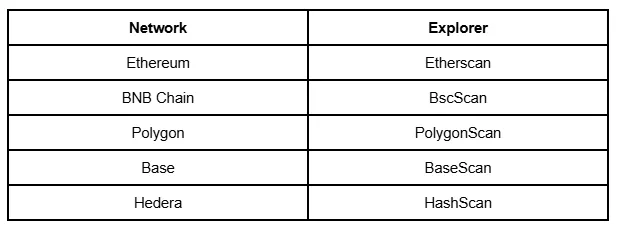
3. Cross-Check Token Listing Sites and Wallet Interfaces
CoinGecko and CoinMarketCap list addresses for tokens across multiple networks and can serve as a secondary source. The issuer's official documentation, however, should remain a priority.
4. Verify the Network Before Copying
Before you copy any address, confirm it belongs to the network you're actually using. As we mentioned, the same token often has different addresses across networks, so if you copy an address from the wrong network, it will point to a different contract.
Security Checklist Before You Use a Contract Address
Here are the core measures to take to ensure you're working with verified contract addresses:
- Head to official project pages manually by typing the address in your browser or opening a saved bookmark.
- Confirm the address exists in the official project documentation.
- Inspect a contract on a network explorer.
- Check which network your wallet is connected to, whether you use HashPack, MetaMask, SaucerSwap Wallet, or another wallet.
- Use trusted DeFi platforms.
- Consider a small test transaction first if you're moving a large amount to confirm the process works as expected before you commit the full sum.
Red Flags of a Fake or Risky Token Address
Some crypto contract addresses you’ll encounter might not necessarily lead to a safe project. Here are the indicators to consider a contract as questionable:
- The site promoting a contract looks like a legitimate project, but the URL has a slight variation
- The name of the token imitates a familiar one, with just a slight difference, for example, not USDC but USCD
- The token logo resembles a well-known token, but the contract details don't match
- No official source lists this address. You found it in a comment or a screenshot
- The token has very low liquidity or appears on very few platforms
- The deployment occurred recently, and there’s no verifiable project history yet.
To avoid risks, before sending tokens or approving a contract:
- Send a small test transaction before moving large amounts
- Confirm you're on the correct network
- Review the spender address and allowance before approving
- Only interact through the official dApp — verify the URL
- Revoke permissions you no longer need via Revoke.cash
How SaucerSwap Users Should Verify Token and Contract Details
SaucerSwap is a decentralized exchange and liquidity hub built on Hedera. Since it uses both native identifiers and EVM-compatible address formats, there are a few Hedera-specific aspects to keep in mind when checking an address and other details:
- Address formats. Alongside EVM-style 0x addresses, Hedera tokens and smart contracts can also be referenced with native Hedera identifiers, such as a Token ID or Contract ID in the 0.0.x format.
- Verification tools. HashScan is Hedera’s network explorer, and it’s a useful place to check Token IDs, Contract IDs, EVM addresses, transaction history, and related details.
- Bridged tokens. A bridged token has its own contract address on Hedera, separate from its address on the original network. Confirm which version you're working with before you proceed.
When Using SaucerSwap on Hedera
Hedera tokens use a different address format than EVM networks — a token ID like 0.0.456858 rather than a 0x address. Before swapping on SaucerSwap, verify the token ID or EVM address against the project's official page or documentation.
Also be aware of the difference between native Hedera tokens and bridged assets. A bridged version of a token is not the same contract as the native one, and the two will have different addresses.
Final Thoughts
Working with crypto contract addresses carries some risks. Some mistakes are easy to make accidentally: since the contract address format looks identical to wallet addresses, it's easy to mix them up and use the wrong one.
Copying an address from the wrong network is another common mistake, since the same token has a different address on each network, and the format alone may not make this mistake obvious. There are also addresses that are set up and spread to deceive.
That’s why it’s critical to verify addresses from an official source, confirm the network, and, generally, rely on trusted platforms, such as SaucerSwap. If you’re considering trading on Hedera, check the SaucerSwap Hedera guide to get familiar with the network.


